
Notice
Recent Posts
Recent Comments
Link
| 일 | 월 | 화 | 수 | 목 | 금 | 토 |
|---|---|---|---|---|---|---|
| 1 | 2 | 3 | 4 | 5 | 6 | 7 |
| 8 | 9 | 10 | 11 | 12 | 13 | 14 |
| 15 | 16 | 17 | 18 | 19 | 20 | 21 |
| 22 | 23 | 24 | 25 | 26 | 27 | 28 |
Tags
- effective java
- optional
- 카프카
- 인텔리제이 단축키
- orelse
- Spring Security
- 싱글톤
- #패스트캠퍼스 #환급챌린지 #패스트캠퍼스후기 #습관형성 #직장인자기계발 #오공완
- mokito
- kafka
- Factory Method Pattern
- producer
- Stream
- 함수형 프로그래밍
- orElseGet
- Functional Programming
- Java
- signWith
- JWT
- Authentication
- topic
- 디자인패턴
- SpringBoot
- Clean Code
- Java8
- 패스트캠퍼스 #환급챌린지 #패스트캠퍼스후기 #습관형성 #직장인자기계발 #오공완
- junit5
- consumer
- git cli
- TDD
Archives
- Today
- Total
goodbye
패스트캠퍼스 환급챌린지 42일차 : 테디노트의 RAG 비법노트 강의 후기 본문
본 포스팅은 패스트캠퍼스 환급 챌린지 참여를 위해 작성하였습니다
https://fastcampus.info/4n8ztzq
(~6/20) 50일의 기적 AI 환급반💫 | 패스트캠퍼스
초간단 미션! 하루 20분 공부하고 수강료 전액 환급에 AI 스킬 장착까지!
fastcampus.co.kr
패스트캠퍼스 환급챌린지 42일차!
1) 공부 시작 시간 인증

2) 공부 종료 시간 인증
3) 강의 수강 클립 인증

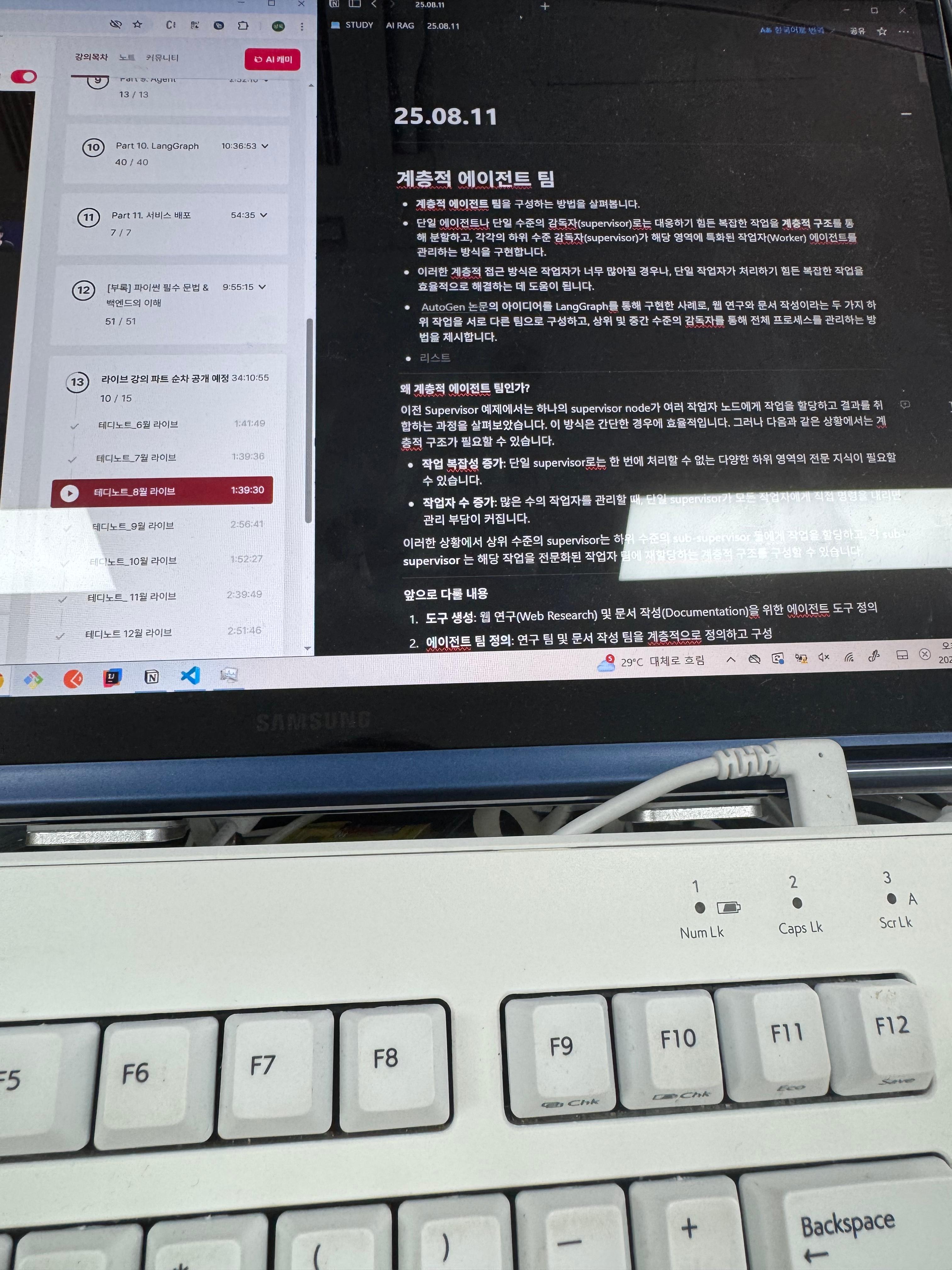
4) 학습 인증샷
5) 학습통계

Today I Learned
계층적 에이전트 팀
- 계층적 에이전트 팀을 구성하는 방법을 살펴봅니다.
- 단일 에이전트나 단일 수준의 감독자(supervisor)로는 대응하기 힘든 복잡한 작업을 계층적 구조를 통해 분할하고, 각각의 하위 수준 감독자(supervisor)가 해당 영역에 특화된 작업자(Worker) 에이전트를 관리하는 방식을 구현합니다.
- 이러한 계층적 접근 방식은 작업자가 너무 많아질 경우나, 단일 작업자가 처리하기 힘든 복잡한 작업을 효율적으로 해결하는 데 도움이 됩니다.
- AutoGen 논문의 아이디어를 LangGraph를 통해 구현한 사례로, 웹 연구와 문서 작성이라는 두 가지 하위 작업을 서로 다른 팀으로 구성하고, 상위 및 중간 수준의 감독자를 통해 전체 프로세스를 관리하는 방법을 제시합니다.
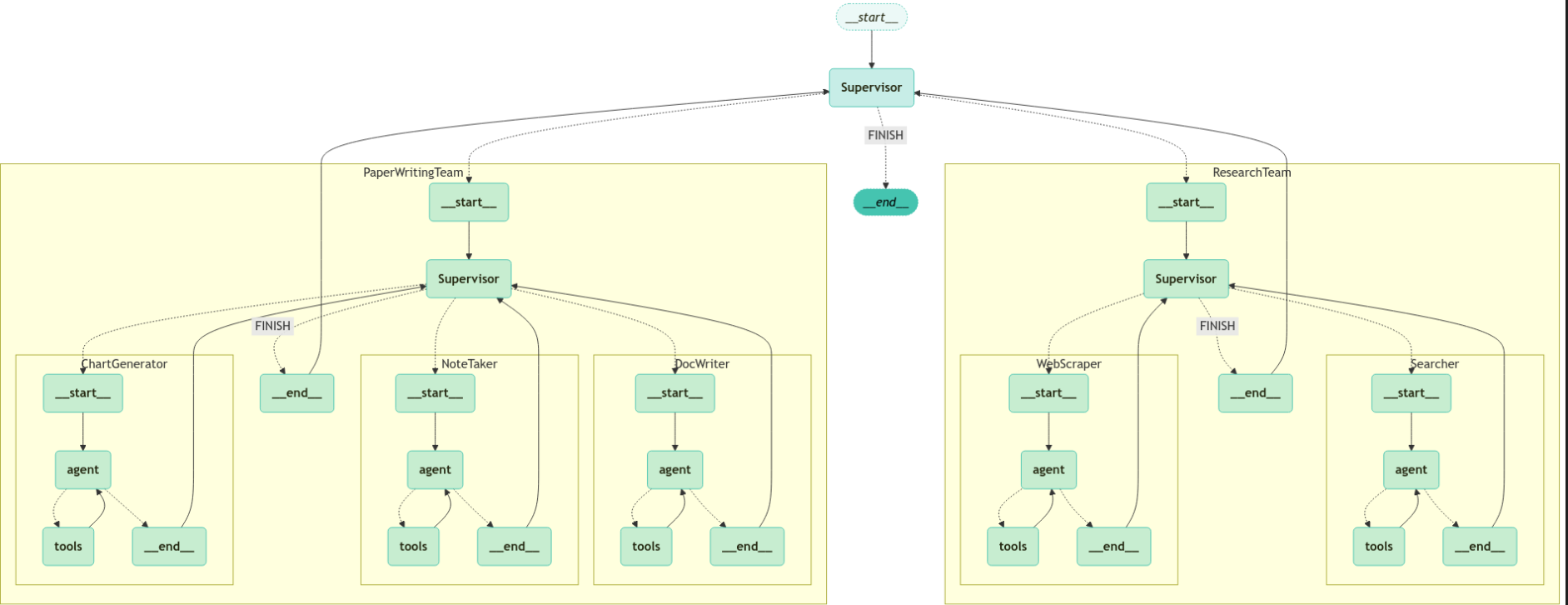
출처 : 테디노트의 RAG 비법노트 (패스트캠퍼스 강의 중 발췌)
왜 계층적 에이전트 팀인가?
이전 Supervisor 예제에서는 하나의 supervisor node가 여러 작업자 노드에게 작업을 할당하고 결과를 취합하는 과정을 살펴보았습니다. 이 방식은 간단한 경우에 효율적입니다. 그러나 다음과 같은 상황에서는 계층적 구조가 필요할 수 있습니다.
- 작업 복잡성 증가: 단일 supervisor로는 한 번에 처리할 수 없는 다양한 하위 영역의 전문 지식이 필요할 수 있습니다.
- 작업자 수 증가: 많은 수의 작업자를 관리할 때, 단일 supervisor가 모든 작업자에게 직접 명령을 내리면 관리 부담이 커집니다.
이러한 상황에서 상위 수준의 supervisor는 하위 수준의 sub-supervisor 들에게 작업을 할당하고, 각 sub-supervisor 는 해당 작업을 전문화된 작업자 팀에 재할당하는 계층적 구조를 구성할 수 있습니다.
앞으로 다룰 내용
- 도구 생성: 웹 연구(Web Research) 및 문서 작성(Documentation)을 위한 에이전트 도구 정의
- 에이전트 팀 정의: 연구 팀 및 문서 작성 팀을 계층적으로 정의하고 구성
- 계층 추가: 상위 수준 그래프와 중간 수준 감독자를 통해 전체 작업을 계층적으로 조정
- 결합: 모든 요소를 통합하여 최종적인 계층적 에이전트 팀 구축
참고
- AutoGen 논문: Enabling Next-Gen LLM Applications via Multi-Agent Conversation (Wu et al.)
- LangGraph - Multi-Agent 개념
도구 생성
- 각 팀은 하나 이상의 에이전트로 구성되며, 각 에이전트는 하나 이상의 도구를 갖추게 됩니다. 아래에서는 다양한 팀에서 사용할 모든 도구를 정의합니다.
ResearchTeam 도구
- ResearchTeam은 웹에서 정보를 찾기 위해 검색 엔진과 URL 스크래퍼를 사용할 수 있습니다
- ResearchTeam의 성능을 향상시키기 위해 추가 기능을 아래에 자유롭게 추가할 수 있습니다.
from typing import List
from langchain_community.document_loaders import WebBaseLoader
from langchain_teddynote.tools.tavily import TavilySearch
from langchain_core.tools import tool

# 검색 도구 정의(TavilySearch)
tavily_tool = TavilySearch(max_results=5)

# 웹 페이지에서 세부 정보를 스크래핑하기 위한 도구 정의
@tool
def scrape_webpages(urls: List[str]) -> str:
    """Use requests and bs4 to scrape the provided web pages for detailed information."""
    # 주어진 URL 목록을 사용하여 웹 페이지 로드
    loader = WebBaseLoader(
        web_path=urls,
        header_template={
            "User-Agent": "Mozilla/5.0 (Windows NT 10.0; Win64; x64) AppleWebKit/537.36 (KHTML, like Gecko) Chrome/102.0.0.0 Safari/537.36",
        },
    )
    docs = loader.load()

    # 로드된 문서의 제목과 내용을 포함한 문자열 생성
    return "\\n\\n".join(
        [
            f'<Document name="{doc.metadata.get("title", "")}">\\n{doc.page_content}\\n</Document>'
            for doc in docs
        ]
    )
문서 작성 팀 도구
- 다음으로, 문서 작성 팀이 사용할 도구(파일 접근 도구)를 정의합니다.
- 이 도구는 에이전트가 파일 시스템에 접근할 수 있도록 하며, 이는 안전하지 않을 수 있습니다. 따라서, 사용에 주의가 필요합니다.
from pathlib import Path
from typing import Dict, Optional, List
from typing_extensions import Annotated

# 임시 디렉토리 생성 및 작업 디렉토리 설정
WORKING_DIRECTORY = Path("./tmp")

# tmp 폴더가 없으면 생성
WORKING_DIRECTORY.mkdir(exist_ok=True)

# 아웃라인 생성 및 파일로 저장
@tool
def create_outline(
    points: Annotated[List[str], "List of main points or sections."],
    file_name: Annotated[str, "File path to save the outline."],
) -> Annotated[str, "Path of the saved outline file."]:
    """Create and save an outline."""
    # 주어진 파일 이름으로 아웃라인을 저장
    with (WORKING_DIRECTORY / file_name).open("w") as file:
        for i, point in enumerate(points):
            file.write(f"{i + 1}. {point}\\n")
    return f"Outline saved to {file_name}"

# 문서 읽기
@tool
def read_document(
    file_name: Annotated[str, "File path to read the document."],
    start: Annotated[Optional[int], "The start line. Default is 0"] = None,
    end: Annotated[Optional[int], "The end line. Default is None"] = None,
) -> str:
    """Read the specified document."""
    # 주어진 파일 이름으로 문서 읽기
    with (WORKING_DIRECTORY / file_name).open("r") as file:
        lines = file.readlines()
    # 시작 줄이 지정되지 않은 경우 기본값 설정
    if start is not None:
        start = 0
    return "\\n".join(lines[start:end])

# 문서 쓰기 및 저장
@tool
def write_document(
    content: Annotated[str, "Text content to be written into the document."],
    file_name: Annotated[str, "File path to save the document."],
) -> Annotated[str, "Path of the saved document file."]:
    """Create and save a text document."""
    # 주어진 파일 이름으로 문서 저장
    with (WORKING_DIRECTORY / file_name).open("w") as file:
        file.write(content)
    return f"Document saved to {file_name}"

# 문서 편집
@tool
def edit_document(
    file_name: Annotated[str, "File path of the document to be edited."],
    inserts: Annotated[
        Dict[int, str],
        "Dictionary where key is the line number (1-indexed) and value is the text to be inserted at that line.",
    ],
) -> Annotated[str, "File path of the edited document."]:
    """Edit a document by inserting text at specific line numbers."""

    # 주어진 파일 이름으로 문서 읽기
    with (WORKING_DIRECTORY / file_name).open("r") as file:
        lines = file.readlines()

    # 삽입할 텍스트를 정렬하여 처리
    sorted_inserts = sorted(inserts.items())

    # 지정된 줄 번호에 텍스트 삽입
    for line_number, text in sorted_inserts:
        if 1 <= line_number <= len(lines) + 1:
            lines.insert(line_number - 1, text + "\\n")
        else:
            return f"Error: Line number {line_number} is out of range."

    # 편집된 문서를 파일에 저장
    with (WORKING_DIRECTORY / file_name).open("w") as file:
        file.writelines(lines)

    return f"Document edited and saved to {file_name}"
다중 에이전트 생성을 위한 유틸리티 함수 정의
- 다음은 작업을 간결하게 수행하기 위한 몇 가지 유틸리티 함수를 생성하는 방법입니다.
- 이때 이전 튜토리얼에서 다룬 functools.partial 함수를 사용하여 에이전트 노드를 생성합니다.
- worker agent 생성.
- sub-graph의 supervisor 생성.
from langgraph.graph import START, END
from langchain_core.messages import HumanMessage
from langchain_openai.chat_models import ChatOpenAI
from langgraph.prebuilt import create_react_agent

# 에이전트 팩토리 클래스
class AgentFactory:
    def __init__(self, model_name):
        self.llm = ChatOpenAI(model=model_name, temperature=0)

    def create_agent_node(self, agent, name: str):
        # 노드 생성 함수
        def agent_node(state):
            result = agent.invoke(state)
            return {
                "messages": [
                    HumanMessage(content=result["messages"][-1].content, name=name)
                ]
            }

        return agent_node

# LLM 초기화
llm = ChatOpenAI(model=MODEL_NAME, temperature=0)

# Agent Factory 인스턴스 생성
agent_factory = AgentFactory(MODEL_NAME)

# 에이전트 정의
search_agent = create_react_agent(llm, tools=[tavily_tool])
# 에이전트 노드 생성
search_node = agent_factory.create_agent_node(search_agent, name="Searcher")
- 팀 감독자(Team Supervisor) 를 생성하는 함수
from langchain_core.prompts import ChatPromptTemplate, MessagesPlaceholder
from langchain_openai import ChatOpenAI
from pydantic import BaseModel
from typing import Literal

def create_team_supervisor(model_name, system_prompt, members) -> str:
    # 다음 작업자 선택 옵션 목록 정의
    options_for_next = ["FINISH"] + members

    # 작업자 선택 응답 모델 정의: 다음 작업자를 선택하거나 작업 완료를 나타냄
    class RouteResponse(BaseModel):
        next: Literal[*options_for_next]

    # ChatPromptTemplate 생성
    prompt = ChatPromptTemplate.from_messages(
        [
            ("system", system_prompt),
            MessagesPlaceholder(variable_name="messages"),
            (
                "system",
                "Given the conversation above, who should act next? "
                "Or should we FINISH? Select one of: {options}",
            ),
        ]
    ).partial(options=str(options_for_next))

    # LLM 초기화
    llm = ChatOpenAI(model=model_name, temperature=0)

    # 프롬프트와 LLM을 결합하여 체인 구성
    supervisor_chain = prompt | llm.with_structured_output(RouteResponse)

    return supervisor_chain
에이전트 팀 정의
연구 팀(Research Team)과 문서 작성 팀(Doc Writing Team)을 정의합니다.
연구 팀(Research Team)
- 연구 팀은 search agent와 web scraping을 담당하는 두 개의 작업자 노드를 가집니다.
- 이들을 생성하고 팀 감독자도 설정해 보겠습니다.
import operator
from typing import List, TypedDict
from typing_extensions import Annotated

from langchain_core.messages import BaseMessage, HumanMessage
from langchain_openai.chat_models import ChatOpenAI
from langgraph.prebuilt import create_react_agent

# 상태 정의
class ResearchState(TypedDict):
    messages: Annotated[List[BaseMessage], operator.add]  # 메시지
    team_members: List[str]  # 멤버 에이전트 목록
    next: str  # Supervisor 에이전트에게 다음 작업자를 선택하도록 지시

# LLM 초기화
llm = ChatOpenAI(model=MODEL_NAME, temperature=0)

# 검색 노드 생성
search_agent = create_react_agent(llm, tools=[tavily_tool])
search_node = agent_factory.create_agent_node(search_agent, name="Searcher")

# 웹 스크래핑 노드 생성
web_scraping_agent = create_react_agent(llm, tools=[scrape_webpages])
web_scraping_node = agent_factory.create_agent_node(
    web_scraping_agent, name="WebScraper"
)

# Supervisor 에이전트 생성
supervisor_agent = create_team_supervisor(
    MODEL_NAME,
    "You are a supervisor tasked with managing a conversation between the"
    " following workers: Search, WebScraper. Given the following user request,"
    " respond with the worker to act next. Each worker will perform a"
    " task and respond with their results and status. When finished,"
    " respond with FINISH.",
    ["Searcher", "WebScraper"],
)

def get_next_node(x):
    return x["next"]
Research Team 그래프 생성
from langchain_teddynote.graphs import visualize_graph
from langgraph.graph import StateGraph
from langgraph.checkpoint.memory import MemorySaver
from langchain_core.runnables import RunnableConfig
from langchain_teddynote.messages import random_uuid, invoke_graph

# 그래프 생성
web_research_graph = StateGraph(ResearchState)

# 노드 추가
web_research_graph.add_node("Searcher", search_node)
web_research_graph.add_node("WebScraper", web_scraping_node)
web_research_graph.add_node("Supervisor", supervisor_agent)

# 엣지 추가
web_research_graph.add_edge("Searcher", "Supervisor")
web_research_graph.add_edge("WebScraper", "Supervisor")

# 조건부 엣지 정의: Supervisor 노드의 결정에 따라 다음 노드로 이동
web_research_graph.add_conditional_edges(
    "Supervisor",
    get_next_node,
    {"Searcher": "Searcher", "WebScraper": "WebScraper", "FINISH": END},
)

# 시작 노드 설정
web_research_graph.set_entry_point("Supervisor")

# 그래프 컴파일
web_research_app = web_research_graph.compile(checkpointer=MemorySaver())

# 그래프 시각화
visualize_graph(web_research_app, xray=True)

def run_graph(app, message: str, recursive_limit: int = 50):
    # config 설정(재귀 최대 횟수, thread_id)
    config = RunnableConfig(
        recursion_limit=recursive_limit, configurable={"thread_id": random_uuid()}
    )

    # 질문 입력
    inputs = {
        "messages": [HumanMessage(content=message)],
    }

    # 그래프 실행
    invoke_graph(app, inputs, config)

    return app.get_state(config).values

output = run_graph(
    web_research_app,
    "<https://finance.naver.com/news> 의 주요 뉴스 정리해서 출력해줘. 출처(URL) 도 함께 출력해줘.",
)

# 최종 결과 출력
print(output["messages"][-1].content)
'Lecture > 패스트캠퍼스' 카테고리의 다른 글
| 패스트캠퍼스 환급챌린지 44일차 : 테디노트의 RAG 비법노트 강의 후기 (1) | 2025.08.13 |
|---|---|
| 패스트캠퍼스 환급챌린지 43일차 : 테디노트의 RAG 비법노트 강의 후기 (6) | 2025.08.12 |
| 패스트캠퍼스 환급챌린지 41일차 : 테디노트의 RAG 비법노트 강의 후기 (4) | 2025.08.10 |
| 패스트캠퍼스 환급챌린지 40일차 : 테디노트의 RAG 비법노트 강의 후기 (5) | 2025.08.10 |
| 패스트캠퍼스 환급챌린지 39일차 : 테디노트의 RAG 비법노트 강의 후기 (6) | 2025.08.08 |
'Lecture/패스트캠퍼스' Related Articles
more


Comments